Omni AI Privacy and Chat History Settings Guide
People tell an assistant things they would hesitate to type into a search box: half-formed worries, real numbers, the draft of the difficult message. That candour is the product's usefulness and its responsibility in one, and it deserves a deliberate privacy setup rather than hopeful defaults. This guide covers the whole surface for the Omni AI chatbot app: chat history controls, what the assistant should never be told, account security, and the seasonal review that keeps your settings matched to your actual usage.
Nothing here requires technical depth. It requires the same judgement you apply to email and cloud storage, because an assistant's history belongs to that family of things — a record, held somewhere, under someone's terms.
Read the provider's current privacy terms once as part of this setup. They are shorter than this guide's conscience and more binding than its advice.
Know What the Record Is
Your chats form a history that the service processes to answer you and retains under its stated policies — for your continuity, for service operation, and within whatever choices the settings give you. Treat the history as a real document with real custodians, because that is what it is.
The practical consequence is a writing rule, not a fear: compose as if a careful stranger administers the archive. That single habit, internalised, outperforms every setting on this page while making all of them easier to choose.
History Controls: Keep, Trim, Delete
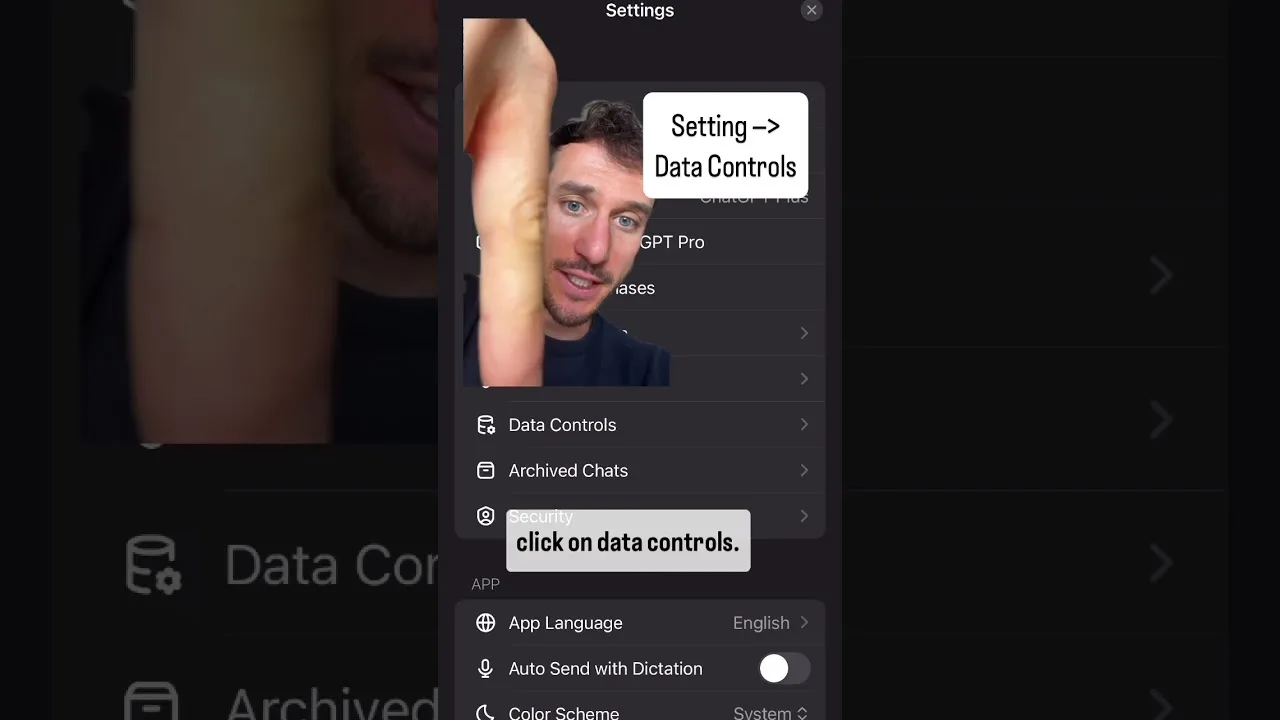
Learn the controls your version offers — reviewing past chats, deleting individual conversations, clearing history wholesale, and any option governing whether chats inform future behaviour — and use them actively rather than discovering them during a scare.
Adopt a retention rhythm that fits your life: keep the useful (the project threads, the study arcs), delete the sensitive and the spent, and never let the archive become an attic you are afraid to enter. A history you curate is a tool; a history you ignore is a liability with good search.
What Never Belongs in a Chat
Passwords, financial credentials, identity documents' numbers, other people's private information, and anything whose exposure would harm you if the archive were ever breached, subpoenaed, or mishandled. Assistants are superb with redacted, summarised, and hypothetical versions of nearly every problem.
Redaction is a skill worth practising: 'a colleague, let us call her M, earns in this band…' loses no usefulness and keeps every real person's facts out of the record. The assistant does not need true names to give true advice.
Account Security Is Privacy's Foundation
A unique password in a manager, a current and secured recovery email, and any additional verification the service offers: this unglamorous trio guards the archive more than any in-app toggle, because nearly all real-world account compromises arrive through credentials, not through the chat window.
Test recovery once while you do not need it. Privacy includes the right to return to your own account, and lockouts are privacy failures with extra steps.
Shared Devices and Household Reality
An assistant signed in on a shared phone or tablet is a diary on the coffee table. If your household shares devices, sign out when finished, use the device's own profile or lock features, and assume anything in the history is readable by the next pair of hands — because it is.
Children's use deserves the same structural honesty: supervise, set the household norms aloud, and let the history controls be a backstop rather than the plan. The study norms in Omni AI for students and homework and this page's settings are two halves of one household policy.
Review What Personalisation Remembers
Where the assistant offers memory or personalisation — preferences it retains to serve you better — review the store occasionally as you would review a profile: correct what drifted, remove what expired, and be pleasantly unsurprised by the rest.
Personalisation is a trade you should re-sign periodically with open eyes: convenience now, against a record that persists. Reasonable people strike the trade differently at different seasons of life; the review is how the trade stays yours. The feature set involved is toured in the main tools in Omni AI explained.
The Seasonal Privacy Review
Twice a year, in one sitting: skim the history for what should be deleted, check retention and personalisation settings, confirm account credentials and recovery, and re-read any changed privacy terms with your actual usage in mind. Twenty minutes, twice a year, and the archive stays a servant.
Do the first review today, while it is a choice. Privacy maintenance is only ever urgent on the day it stops being optional, and that day is chosen by other people.
Write as if the archive is real, curate it like a tool, guard the account like a door, and review the whole arrangement twice a year. Inside those habits, an assistant can be told the truth — which is when it becomes genuinely useful.
Candour with boundaries is not a contradiction. It is the entire design of a trustworthy confidant, human or otherwise.
One more setting deserves a sentence of its own: notifications. An assistant that previews its replies on your lock screen is publishing fragments of your archive to anyone near the phone, however good the rest of your setup is. Restrict previews for the app as you would for a messaging app carrying private conversations, and let the archive's privacy be decided by your settings rather than by the lock screen's defaults. The smallest doors are the ones settings pages forget to mention.
Related Articles

How to Update Omni AI to the Latest Version
Update Omni AI on Android in place: check the version, keep your chats and settings, verify with a familiar question, and fix stalled updates.
Read More →
Omni AI Prompt Writing Guide: Ask Better, Get Better
Write prompts Omni AI answers well: context, format, examples, and step-by-step requests, plus the iteration habit that sharpens every answer.
Read More →
Writing and Essays With Omni AI: Draft, Structure, Polish
Use Omni AI for writing without losing your voice: outlines, drafts in your material, editing passes, and keeping authorship honestly yours.
Read More →
Omni AI for Students and Homework: Learn Faster, Honestly
Use Omni AI as a study partner: explanations at your level, practice questions, essay structure help, and the honesty rules that keep learning real.
Read More →
How to Ask Omni AI About Images and Documents
Ask Omni AI about photos, screenshots, and documents: what vision handles well, preparing clear inputs, reading results critically, and privacy care.
Read More →
Omni AI Voice Chat Tips: Talk Naturally, Get More
Use voice chat in Omni AI well: setup, natural pacing, dictating long inputs, hands-free uses, and fixing recognition that keeps misunderstanding you.
Read More →